← All projects
MULTIMODAL INPUT · ROFLOW, NUWA ROBOTICS
Letting robot flows carry photos, video, and voice
Capture modules that turn what a robot sees and hears into data a flow can send anywhere, from a retailer’s cloud service to a hospital’s on-premises AI. Plus a waiting pattern that keeps the robot readable while it thinks.
Role
Product designer, end to end
Shipped
Photo, video & recording modules
Worked with
App, FE & BE engineering


Thinking


“Which shoes go with this outfit?”
AT A GLANCE
Robot flows could carry text, but not media
PROBLEM
Roflow flows ran on text. Speech went through Roflow’s cloud speech recognition and came back as text; photos and video had no way into a flow at all. That blocked clients who wanted their own services to analyze what the robot saw, and hospitals and schools that couldn’t send audio off-site, not even for transcription.
WHAT I DID
Designed photo, video, and recording modules end to end, each turning what the robot captures into a variable an API module can send on. Designed a waiting-response pattern across modules, later added to the API module.
OUTCOME
Shipped on Roflow and adopted by clients, including a trial with a national health-and-beauty retail chain. On-premises clients could now build voice conversations without anything touching the cloud.
CONTEXT
Roflow: a no-code editor for robot behavior
Clients and partners (“creators”) build what a robot does by connecting modules on a canvas. Each module is one step: say something, show media, wait for a reply, call an API.
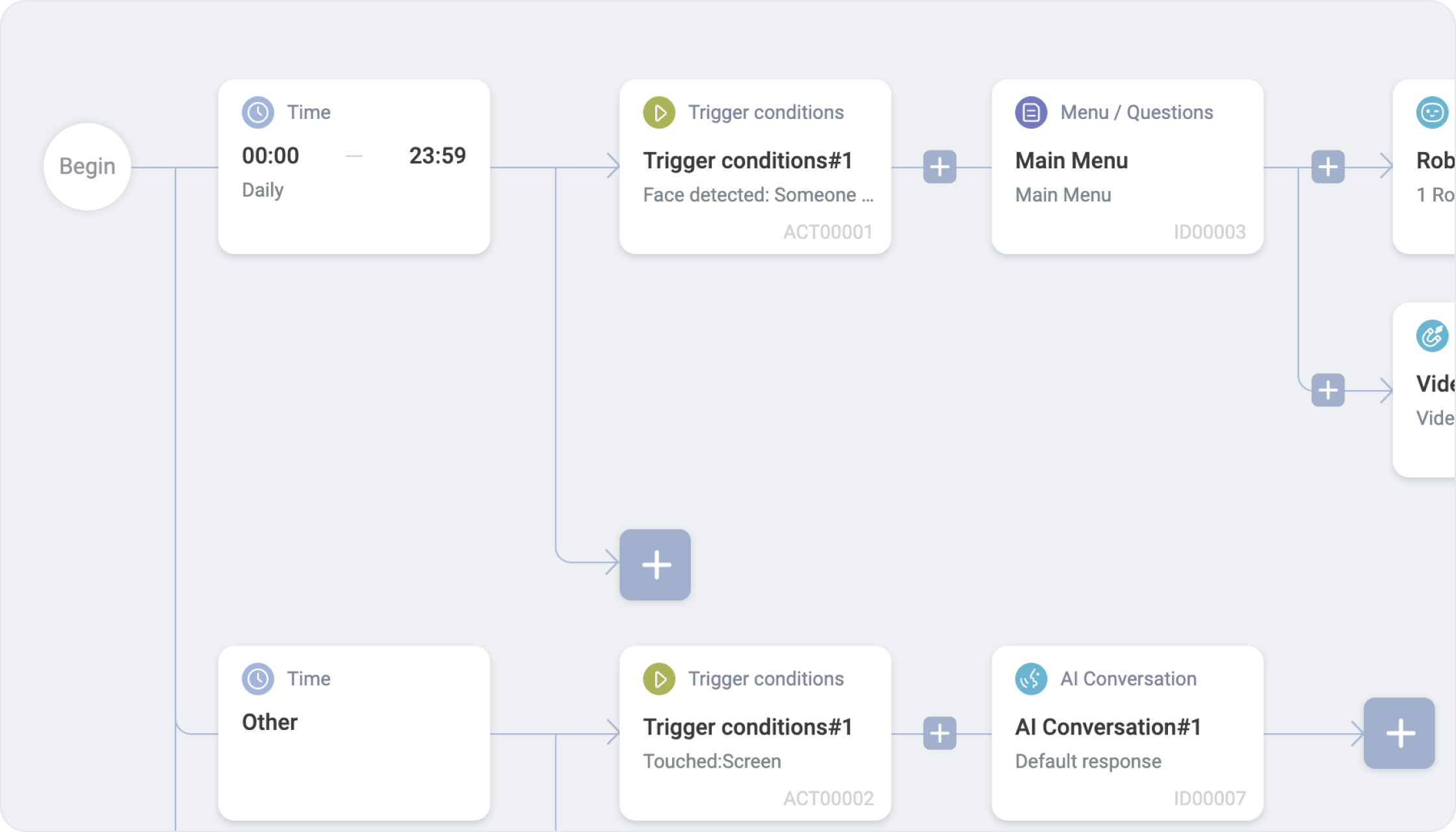
The gap: flows ran on text
Speech reached a flow only after Roflow’s cloud speech recognition turned it into text, and photos and video couldn’t enter a flow at all. Clients wanted two things Roflow couldn’t do: send what the robot saw to their own services for analysis and, for hospitals and schools, keep audio on their own servers, with not even transcription in the cloud.
What clients wanted to build
RETAIL
A shopper asks for recommendations. The robot takes a photo, sends it to the store’s own server for outfit analysis, and suggests products from the result.
STORE OPERATIONS
The robot photographs the floor at set intervals so staff can review foot traffic and where shoppers linger.
LONG-TERM CARE
The robot photographs residents to keep a regular record of their appearance and activities, instead of staff taking phone photos and uploading them by hand.
THE CORE IDEA
Make capture a building block, not a feature
Instead of building one “photo recognition” feature, I designed each capture module to do one thing: record what the robot sees or hears and save it as a variable. Creators then wire that variable into API modules that call whatever system the client runs, so the same three modules serve a shoe store and a hospital.
01 · ON THE ROBOT
Capture
Photo, video, or audio from the robot’s camera or mic
→
02 · ON THE ROBOT
Save as variable
As a file path or base64, chosen by the creator
→
ON THE CLIENT’S OWN SYSTEMS, CLOUD OR ON-PREMISES, VIA API MODULES
03
Speech recognition
The client’s ASR turns audio into text
→
04
AI brain
The client’s model decides the reply
→
05 · ON THE ROBOT
Respond
Speaks the reply with face and subtitles
Creators, on the web
Pick a mode (photo, video, or audio), how capture starts and ends, and where the result is stored, then connect API modules downstream.
End users, at the robot
The robot opens the camera or recorder, captures with a tap or a countdown, and the flow continues on its own, with nothing to configure.
KEY DECISIONS
Designing for a robot in a public space
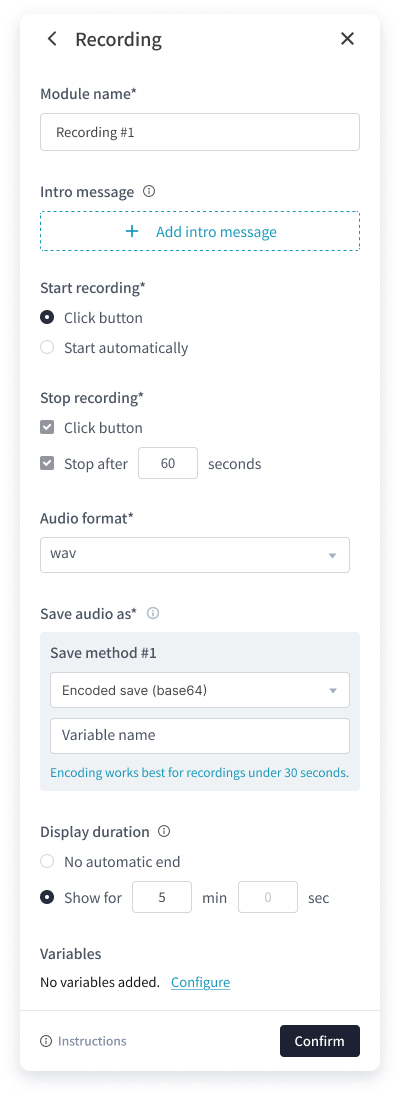
Shipped recording module settings
01
Reuse the camera app, don’t rebuild it
Nuwa robots already had a camera app. Rather than design a new one, I opened it from Roflow and specified which controls to strip, so it behaves like a step in a flow instead of a standalone app.
02
Tap or hands-free, always with a limit
Creators choose whether capture starts with a tap or an automatic countdown, and set a hard time cap. On the robot, stop and re-record stay disabled for the first two seconds to prevent accidental taps, and a warning appears five seconds before the cap.
03
Storage choices with guardrails
A file path suits files other apps will read; base64 suits sending over a network. Choosing base64 shows an inline hint to keep recordings under 30 seconds, catching a setting that would produce oversized payloads.
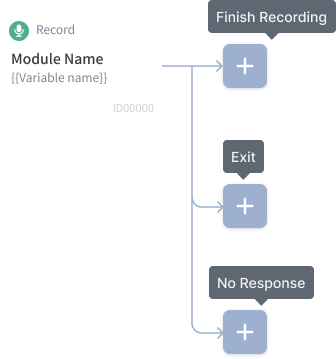
Each module is a node on the canvas. Its three exits connect to whatever should happen next.
04
Every capture ends in a known branch
Each module exits through Completed, Left, or No response. If no one acts before the display time runs out, the flow moves to No response instead of waiting forever.
THE HARD PART
A silent robot looks like a broken robot
When a client runs its own speech recognition and AI, every voice turn makes two calls: transcription, then the AI model. That can take several seconds, especially on a client’s own hardware. In the field I had already seen users confused about why the robot was slow, so I designed a waiting pattern that shows which stage the robot is in. It started in the capture modules and became a pattern across modules.


Recording…
1
Listening
ASR: “Which shoes go with this?”
2
Shows what it heard


Thinking…
“waiting voice”
3
Thinking

Reply as subtitle + speech
4
Answers
Bringing the pattern into the API module
Waiting voice
An optional line the robot says while the API call runs, so the pause sounds intentional.
Three outcomes, three responses
Success, failure, and timeout each get their own reply, so a slow or failed server never leaves the user in silence.
Why it mattered
Once capture shipped, clients could pair the recording module with API modules to build voice conversations on their own systems, including hospitals and schools that kept everything on-premises. That is where the waiting pattern did the most work.
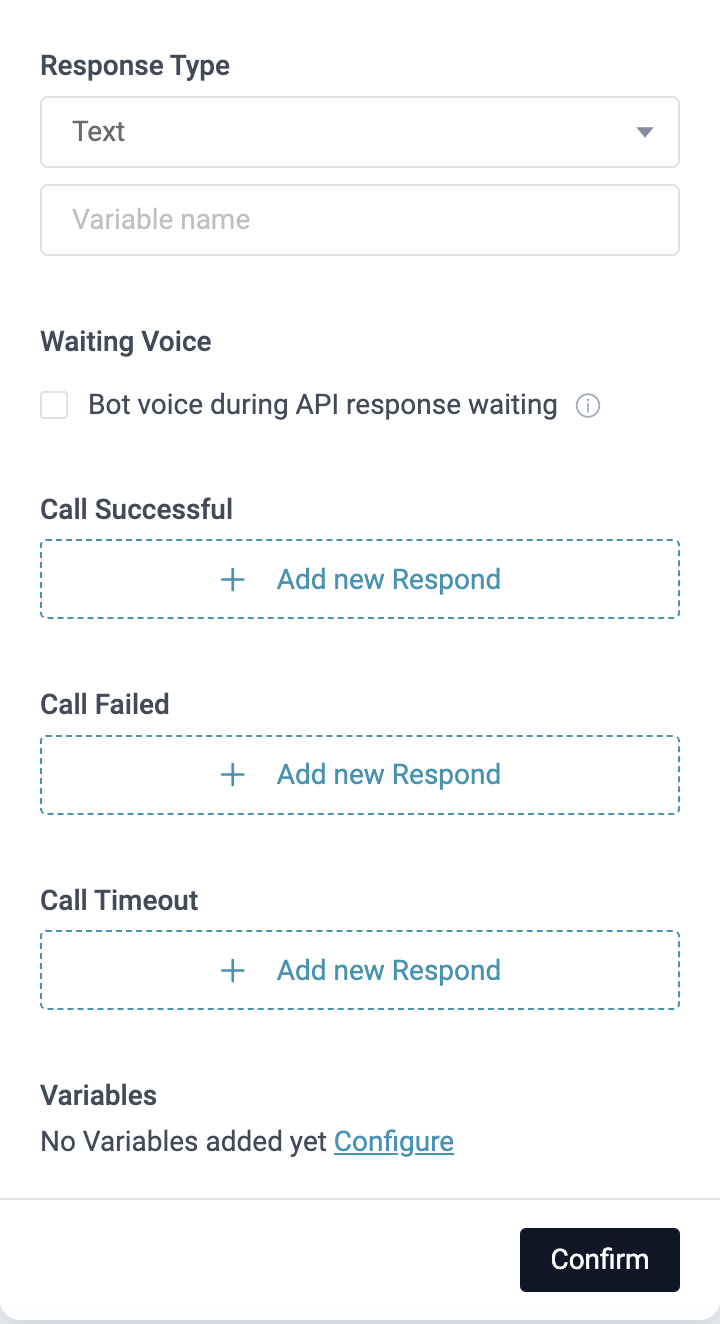
API module: response type, waiting voice, outcomes
OUTCOME
Shipped, adopted, and one request left open
SHIPPED
Photo, video, and recording modules launched on Roflow, along with the waiting pattern in the API module.
ADOPTED
Used by clients, including a trial with a national health-and-beauty retail chain.
REQUESTED NEXT
Clients asked to show the captured photo later in the flow. We didn’t build it before I left.
What I carry forward
Close the loop for the person in front of the robot
A capture that disappears into a variable is invisible to the end user. The one request we heard, showing the photo back, points at exactly that: people want to see what the robot saw before trusting what it says.
Patterns travel further than features
The waiting pattern began in one module and ended up across several, including the API module. Designing it as a reusable pattern, not a one-off state, is what let it spread.
NEXT PROJECT
Context-Aware Dialog Module →
Turning a robot’s open-ended chat into a step that knows when it’s done
© 2026 YuJouTu. All rights reserved.
← All projects
MULTIMODAL INPUT · ROFLOW, NUWA ROBOTICS
Letting robot flows carry photos, video, and voice
Capture modules that turn what a robot sees and hears into data a flow can send anywhere, from a retailer’s cloud service to a hospital’s on-premises AI. Plus a waiting pattern that keeps the robot readable while it thinks.
Role
Product designer, end to end
Shipped
Photo, video & recording modules
Worked with
App, FE & BE engineering


Thinking


“Which shoes go with this outfit?”
AT A GLANCE
Robot flows could carry text, but not media
PROBLEM
Roflow flows ran on text. Speech went through Roflow’s cloud speech recognition and came back as text; photos and video had no way into a flow at all. That blocked clients who wanted their own services to analyze what the robot saw, and hospitals and schools that couldn’t send audio off-site, not even for transcription.
WHAT I DID
Designed photo, video, and recording modules end to end, each turning what the robot captures into a variable an API module can send on. Designed a waiting-response pattern across modules, later added to the API module.
OUTCOME
Shipped on Roflow and adopted by clients, including a trial with a national health-and-beauty retail chain. On-premises clients could now build voice conversations without anything touching the cloud.
CONTEXT
Roflow: a no-code editor for robot behavior
Clients and partners (“creators”) build what a robot does by connecting modules on a canvas. Each module is one step: say something, show media, wait for a reply, call an API.
The gap: flows ran on text
Speech reached a flow only after Roflow’s cloud speech recognition turned it into text, and photos and video couldn’t enter a flow at all. Clients wanted two things Roflow couldn’t do: send what the robot saw to their own services for analysis and, for hospitals and schools, keep audio on their own servers, with not even transcription in the cloud.
What clients wanted to build
RETAIL
A shopper asks for recommendations. The robot takes a photo, sends it to the store’s own server for outfit analysis, and suggests products from the result.
STORE OPERATIONS
The robot photographs the floor at set intervals so staff can review foot traffic and where shoppers linger.
LONG-TERM CARE
The robot photographs residents to keep a regular record of their appearance and activities, instead of staff taking phone photos and uploading them by hand.
THE CORE IDEA
Make capture a building block, not a feature
Instead of building one “photo recognition” feature, I designed each capture module to do one thing: record what the robot sees or hears and save it as a variable. Creators then wire that variable into API modules that call whatever system the client runs, so the same three modules serve a shoe store and a hospital.
01 · ON THE ROBOT
Capture
Photo, video, or audio from the robot’s camera or mic
→
02 · ON THE ROBOT
Save as variable
As a file path or base64, chosen by the creator
→
ON THE CLIENT’S OWN SYSTEMS, CLOUD OR ON-PREMISES, VIA API MODULES
03
Speech recognition
The client’s ASR turns audio into text
→
04
AI brain
The client’s model decides the reply
→
05 · ON THE ROBOT
Respond
Speaks the reply with face and subtitles
Creators, on the web
Pick a mode (photo, video, or audio), how capture starts and ends, and where the result is stored, then connect API modules downstream.
End users, at the robot
The robot opens the camera or recorder, captures with a tap or a countdown, and the flow continues on its own, with nothing to configure.
KEY DECISIONS
Designing for a robot in a public space
Shipped recording module settings
01
Reuse the camera app, don’t rebuild it
Nuwa robots already had a camera app. Rather than design a new one, I opened it from Roflow and specified which controls to strip, so it behaves like a step in a flow instead of a standalone app.
02
Tap or hands-free, always with a limit
Creators choose whether capture starts with a tap or an automatic countdown, and set a hard time cap. On the robot, stop and re-record stay disabled for the first two seconds to prevent accidental taps, and a warning appears five seconds before the cap.
03
Storage choices with guardrails
A file path suits files other apps will read; base64 suits sending over a network. Choosing base64 shows an inline hint to keep recordings under 30 seconds, catching a setting that would produce oversized payloads.
Each module is a node on the canvas. Its three exits connect to whatever should happen next.
04
Every capture ends in a known branch
Each module exits through Completed, Left, or No response. If no one acts before the display time runs out, the flow moves to No response instead of waiting forever.
THE HARD PART
A silent robot looks like a broken robot
When a client runs its own speech recognition and AI, every voice turn makes two calls: transcription, then the AI model. That can take several seconds, especially on a client’s own hardware. In the field I had already seen users confused about why the robot was slow, so I designed a waiting pattern that shows which stage the robot is in. It started in the capture modules and became a pattern across modules.
Recording…
1
Listening
ASR: “Which shoes go with this?”
2
Shows what it heard
Thinking…
“waiting voice”
3
Thinking
Reply as subtitle + speech
4
Answers
Bringing the pattern into the API module
Waiting voice
An optional line the robot says while the API call runs, so the pause sounds intentional.
Three outcomes, three responses
Success, failure, and timeout each get their own reply, so a slow or failed server never leaves the user in silence.
Why it mattered
Once capture shipped, clients could pair the recording module with API modules to build voice conversations on their own systems, including hospitals and schools that kept everything on-premises. That is where the waiting pattern did the most work.
API module: response type, waiting voice, outcomes
OUTCOME
Shipped, adopted, and one request left open
SHIPPED
Photo, video, and recording modules launched on Roflow, along with the waiting pattern in the API module.
ADOPTED
Used by clients, including a trial with a national health-and-beauty retail chain.
REQUESTED NEXT
Clients asked to show the captured photo later in the flow. We didn’t build it before I left.
What I carry forward
Close the loop for the person in front of the robot
A capture that disappears into a variable is invisible to the end user. The one request we heard, showing the photo back, points at exactly that: people want to see what the robot saw before trusting what it says.
Patterns travel further than features
The waiting pattern began in one module and ended up across several, including the API module. Designing it as a reusable pattern, not a one-off state, is what let it spread.
NEXT PROJECT
Context-Aware Dialog Module →
Turning a robot’s open-ended chat into a step that knows when it’s done
© 2026 YuJouTu. All rights reserved.
← All projects
MULTIMODAL INPUT · ROFLOW, NUWA ROBOTICS
Letting robot flows carry photos, video, and voice
Capture modules that turn what a robot sees and hears into data a flow can send anywhere, from a retailer’s cloud service to a hospital’s on-premises AI. Plus a waiting pattern that keeps the robot readable while it thinks.
Role
Product designer, end to end
Shipped
Photo, video & recording modules
Worked with
App, FE & BE engineering
Thinking
“Which shoes go with this outfit?”
AT A GLANCE
Robot flows could carry text, but not media
PROBLEM
Roflow flows ran on text. Speech went through Roflow’s cloud speech recognition and came back as text; photos and video had no way into a flow at all. That blocked clients who wanted their own services to analyze what the robot saw, and hospitals and schools that couldn’t send audio off-site, not even for transcription.
WHAT I DID
Designed photo, video, and recording modules end to end, each turning what the robot captures into a variable an API module can send on. Designed a waiting-response pattern across modules, later added to the API module.
OUTCOME
Shipped on Roflow and adopted by clients, including a trial with a national health-and-beauty retail chain. On-premises clients could now build voice conversations without anything touching the cloud.
CONTEXT
Roflow: a no-code editor for robot behavior
Clients and partners (“creators”) build what a robot does by connecting modules on a canvas. Each module is one step: say something, show media, wait for a reply, call an API.
The gap: flows ran on text
Speech reached a flow only after Roflow’s cloud speech recognition turned it into text, and photos and video couldn’t enter a flow at all. Clients wanted two things Roflow couldn’t do: send what the robot saw to their own services for analysis and, for hospitals and schools, keep audio on their own servers, with not even transcription in the cloud.
What clients wanted to build
RETAIL
A shopper asks for recommendations. The robot takes a photo, sends it to the store’s own server for outfit analysis, and suggests products from the result.
STORE OPERATIONS
The robot photographs the floor at set intervals so staff can review foot traffic and where shoppers linger.
LONG-TERM CARE
The robot photographs residents to keep a regular record of their appearance and activities, instead of staff taking phone photos and uploading them by hand.
THE CORE IDEA
Make capture a building block, not a feature
Instead of building one “photo recognition” feature, I designed each capture module to do one thing: record what the robot sees or hears and save it as a variable. Creators then wire that variable into API modules that call whatever system the client runs, so the same three modules serve a shoe store and a hospital.
01 · ON THE ROBOT
Capture
Photo, video, or audio from the robot’s camera or mic
→
02 · ON THE ROBOT
Save as variable
As a file path or base64, chosen by the creator
→
ON THE CLIENT’S OWN SYSTEMS, CLOUD OR ON-PREMISES, VIA API MODULES
03
Speech recognition
The client’s ASR turns audio into text
→
04
AI brain
The client’s model decides the reply
→
05 · ON THE ROBOT
Respond
Speaks the reply with face and subtitles
Creators, on the web
Pick a mode (photo, video, or audio), how capture starts and ends, and where the result is stored, then connect API modules downstream.
End users, at the robot
The robot opens the camera or recorder, captures with a tap or a countdown, and the flow continues on its own, with nothing to configure.
KEY DECISIONS
Designing for a robot in a public space
Shipped recording module settings
01
Reuse the camera app, don’t rebuild it
Nuwa robots already had a camera app. Rather than design a new one, I opened it from Roflow and specified which controls to strip, so it behaves like a step in a flow instead of a standalone app.
02
Tap or hands-free, always with a limit
Creators choose whether capture starts with a tap or an automatic countdown, and set a hard time cap. On the robot, stop and re-record stay disabled for the first two seconds to prevent accidental taps, and a warning appears five seconds before the cap.
03
Storage choices with guardrails
A file path suits files other apps will read; base64 suits sending over a network. Choosing base64 shows an inline hint to keep recordings under 30 seconds, catching a setting that would produce oversized payloads.
Each module is a node on the canvas. Its three exits connect to whatever should happen next.
04
Every capture ends in a known branch
Each module exits through Completed, Left, or No response. If no one acts before the display time runs out, the flow moves to No response instead of waiting forever.
THE HARD PART
A silent robot looks like a broken robot
When a client runs its own speech recognition and AI, every voice turn makes two calls: transcription, then the AI model. That can take several seconds, especially on a client’s own hardware. In the field I had already seen users confused about why the robot was slow, so I designed a waiting pattern that shows which stage the robot is in. It started in the capture modules and became a pattern across modules.
Recording…
1
Listening
ASR: “Which shoes go with this?”
2
Shows what it heard
Thinking…
“waiting voice”
3
Thinking
Reply as subtitle + speech
4
Answers
Bringing the pattern into the API module
Waiting voice
An optional line the robot says while the API call runs, so the pause sounds intentional.
Three outcomes, three responses
Success, failure, and timeout each get their own reply, so a slow or failed server never leaves the user in silence.
Why it mattered
Once capture shipped, clients could pair the recording module with API modules to build voice conversations on their own systems, including hospitals and schools that kept everything on-premises. That is where the waiting pattern did the most work.
API module: response type, waiting voice, outcomes
OUTCOME
Shipped, adopted, and one request left open
SHIPPED
Photo, video, and recording modules launched on Roflow, along with the waiting pattern in the API module.
ADOPTED
Used by clients, including a trial with a national health-and-beauty retail chain.
REQUESTED NEXT
Clients asked to show the captured photo later in the flow. We didn’t build it before I left.
What I carry forward
Close the loop for the person in front of the robot
A capture that disappears into a variable is invisible to the end user. The one request we heard, showing the photo back, points at exactly that: people want to see what the robot saw before trusting what it says.
Patterns travel further than features
The waiting pattern began in one module and ended up across several, including the API module. Designing it as a reusable pattern, not a one-off state, is what let it spread.
NEXT PROJECT
Context-Aware Dialog Module →
Turning a robot’s open-ended chat into a step that knows when it’s done
© 2026 YuJouTu. All rights reserved.