← All projects
CROSS-END DESIGN · ROFLOW, NUWA ROBOTICS
Context-Aware Dialog Module
Turning a service robot’s open-ended chat into a conversation that knows when a task is done, and hands off to the workflow.
Role
Lead product designer
Product
Roflow, low-code workflow editor
Shipped
Phases 11–12, two iterations
AT A GLANCE
From a chat box to a step in the workflow
PROBLEM
Roflow’s chat node answered open-endedly, dropped context between turns, and never handed off to the rest of the workflow.
WHAT I DID
Led the design of a context-aware dialog node across two iterations: from single-task completion to multi-task intent evaluation with slot filling. Wrote the logic specs and edge cases with AI engineering.
OUTCOME
Both iterations launched on Roflow after pre-launch testing with partners and clients. Iteration 2 was field-tested in a shopping mall through a Japanese government-backed proof-of-concept program.
Worked with
PM
AI engineering
App / FE / BE engineering
BD & Sales
COO / CTO
Deployment partners
CONTEXT
Roflow: a low-code editor for robot workflows
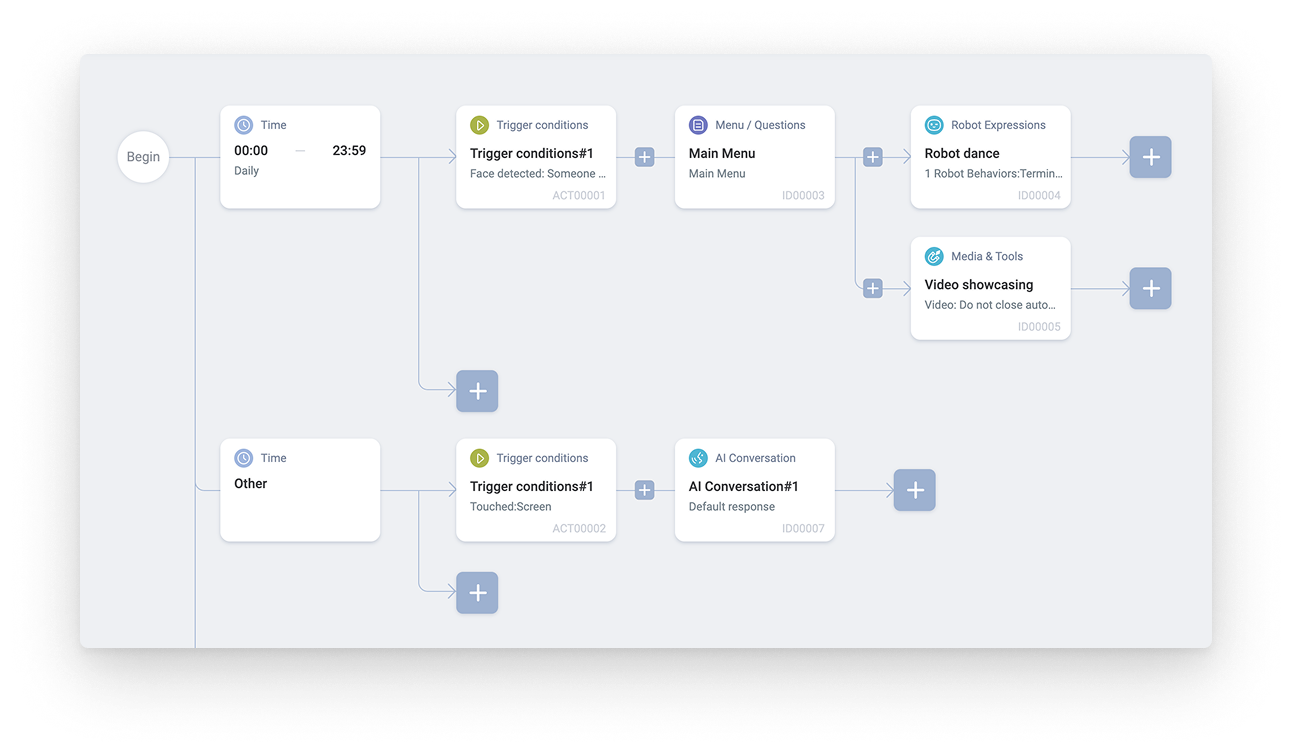
Deployment partners, clients, and internal teams build a robot’s behavior by wiring nodes on a canvas: triggers, media, robot expressions, and AI dialog. Engineering had just built a parallel-processing architecture that lets the robot handle one request while listening for the next. Roflow was chosen to showcase it, and that became the seed for this module: a dialog node that holds context across a service task instead of restarting every turn.
THE PROBLEM
The old chat node broke down in three ways
It was meant to carry a service conversation from open chat to a completed task. In practice:
01
Open-ended chat
The robot answered questions indefinitely and never registered that a service goal had been met.
02
Context dropped between turns
System state and earlier user input weren’t carried into the prompt, so every turn started cold.
03
No handoff to the workflow
Without a completion signal, downstream nodes had no reliable moment to take over.
ITERATION 01
Detect one task’s completion, then hand off
The first release moved only as far as the new architecture allowed: recognise when a single task was done, and pass control back to the workflow.
A panel that follows how creators think
Sections run in the order a creator reasons through a service encounter: what the module is, what it’s trying to achieve, how it recognises success or failure, and what happens if no one responds.
Two layers decide when a conversation ends
Task completion is open-ended: the creator writes a prompt and the AI judges whether the user’s goal was met. Underneath sit hard limits (a round cap, a no-response count, a keyword trigger) as a safety net when the AI’s judgment never resolves.
Known limit
Variables could be attached to a task’s success, but only with manually assigned values. The AI couldn’t yet fill them from the conversation.

WHAT THE FIELD TOLD US
Iteration 1 landed, and exposed its own ceiling
“Teams started using it to replace other AI dialogue modules.”
Deployment partner
“It understands what customers actually want.”
BD
“It feels noticeably smarter than before.”
Sales
Secondhand feedback from BD, Sales, and deployment partners after field pitches; not formal usability testing.
KEY INSIGHT
One task at a time didn’t survive real service scenarios.
In a hospital lobby, the same robot may be asked for directions, a delivery to a room, or an FAQ answer, and a delivery can’t start until it knows the item, quantity, and room. With one completion criterion per node, creators had to chain nodes for every combination, which quickly becomes unmaintainable on a canvas.
ITERATION 02
Multi-task intent and entities
Recognise several possible tasks in one node, let the AI gather the values each task needs, and inject them into the workflow. The node stopped being a chat box and became a step that can end.
STEP 01
Ingest
System variables and live user input enter the prompt, so the model knows the task’s state so far.
→
STEP 02
Evaluate
The AI checks the conversation against every task card. Once one task’s criteria are met and its values collected, the conversation ends.
→
STEP 03
Hand off
The node exits with that task’s values and triggers downstream actions, keeping dialog and physical behavior in step.
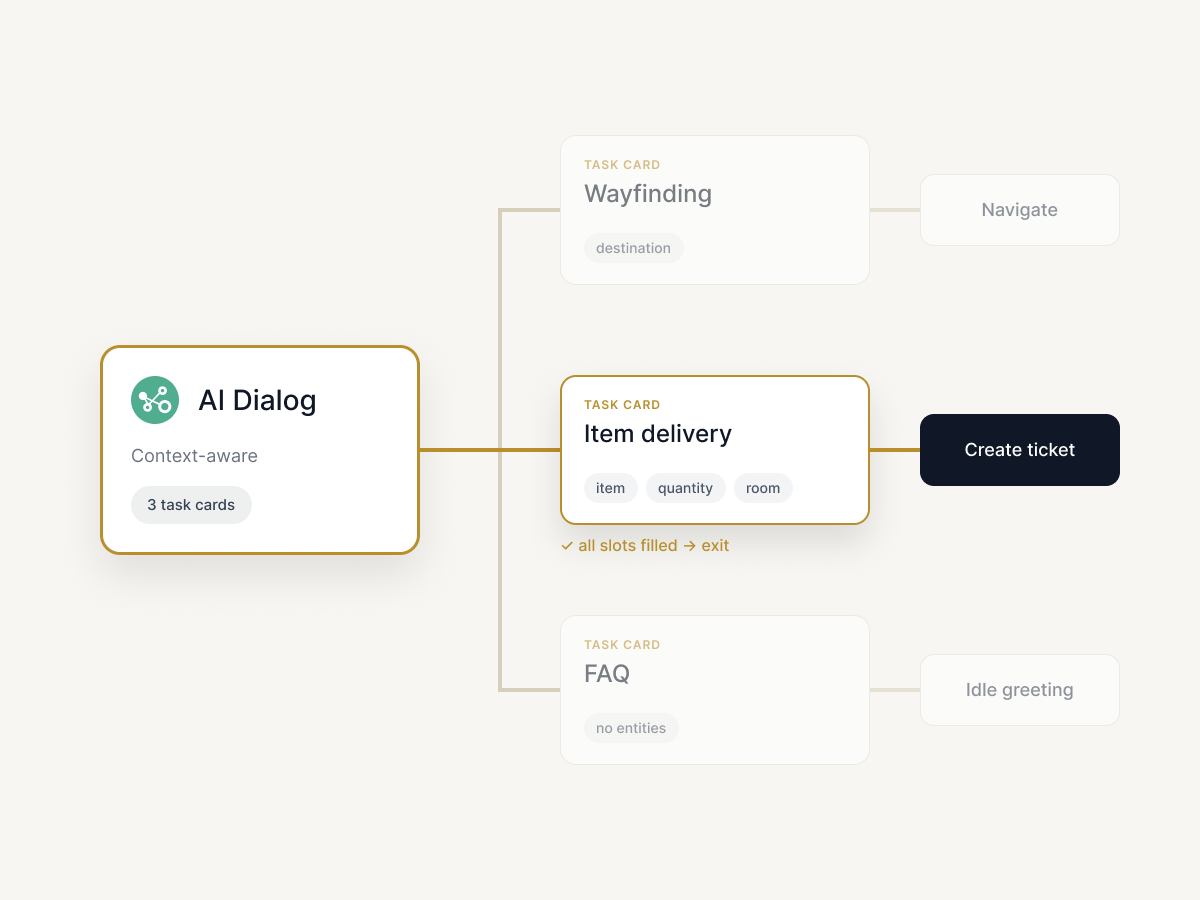
Tasks became cards, each with its own exit
Task card · multi-task definition
Creators declare each task the node should recognise, by name, instead of one goal per node.
Criteria · per-task completion
Each card carries its own criterion. The first task satisfied ends the conversation and routes to its own branch.
Get entity · slot filling
Required values are declared as slots, and the AI asks for what’s missing instead of failing silently.
Logic specification: intent, entities, and exit behavior
Task
Completion criterion
Required entities
On exit
Wayfinding
Destination confirmed by user
destination
Trigger navigation node
Item delivery
All required slots filled
item, quantity, room
Create service ticket
FAQ
Answer delivered, no follow-up
none
Return to idle greeting
Two intents at once
AI judges which one task was completed
That task’s entities
Route to that task’s branch
THE HARD PART
Designing for the ambiguous middle
In a low-code tool, the edge cases belong to the creator as much as the end user. These are the ones I specified with AI engineering.
Missing entity after repeated asks
The node stops re-prompting, marks the task failed, and runs the fallback instruction instead of trapping the user in a loop.
Two tasks both plausible
The robot confirms in one question instead of guessing, because a wrong physical action costs more than an extra turn.
Off-scope request
Nothing matches a task card, so the node answers from the knowledge base and leaves task state untouched.
Misconfiguration by the creator
A criterion that can never be satisfied is a likely authoring error, and the reason engineering was nervous about the whole feature.
Unblocking gridlock between engineering risk and feature ambition
ENGINEERING
Worried, informally, that creators would misconfigure completion criteria and file the results as bugs.
vs.
PRODUCT
Wanted the full multi-task scope in the same release cycle.
What I did
01
Documented the informal engineering concerns as structured friction logs, so the risk was reviewable rather than anecdotal.
02
Pushed for PM accountability on which items were specification gaps versus engineering unknowns.
03
Escalated the operational tradeoff to the COO and proposed user training as the mitigation for authoring risk.
Result: scope was trimmed to what engineering could ship safely. For example, entities per task were capped after initial testing, and the rest of the multi-task scope moved to the roadmap.
ITERATION 1 → 2
What changed
Dimension
Iteration 01
Iteration 02
Intent handling
One task per node
Several tasks recognised in one node
Parameters
Assumed present in the utterance
Declared as slots, collected by the AI
Completion
Single criterion
Per-task criteria with independent exits
Authoring cost
Chained nodes per combination
One node, several task cards
TAKEAWAYS
What I carry forward
Ship the smaller model first
Single-task completion was worth releasing on its own. Field pitches taught us what multi-task actually had to cover.
Author for the misconfiguration
In a low-code tool, the panel has to make an impossible criterion hard to write.
Guide the abstraction level, not just the fields
The task-card model was sound, but creators still had to decide how broadly to define a task, and clients often expected more than the module could do. Next time I’d add examples, defaults, and validation that nudge them toward the right level.
Write the friction down
Turning informal engineering anxiety into a reviewable log moved the decision out of standup and up to leadership.
© 2026 YuJouTu. All rights reserved.
← All projects
CROSS-END DESIGN · ROFLOW, NUWA ROBOTICS
Context-Aware Dialog Module
Turning a service robot’s open-ended chat into a conversation that knows when a task is done, and hands off to the workflow.
Role
Lead product designer
Product
Roflow, low-code workflow editor
Shipped
Phases 11–12, two iterations
AT A GLANCE
From a chat box to a step in the workflow
PROBLEM
Roflow’s chat node answered open-endedly, dropped context between turns, and never handed off to the rest of the workflow.
WHAT I DID
Led the design of a context-aware dialog node across two iterations: from single-task completion to multi-task intent evaluation with slot filling. Wrote the logic specs and edge cases with AI engineering.
OUTCOME
Both iterations launched on Roflow after pre-launch testing with partners and clients. Iteration 2 was field-tested in a shopping mall through a Japanese government-backed proof-of-concept program.
Worked with
PM
AI engineering
App / FE / BE engineering
BD & Sales
COO / CTO
Deployment partners
CONTEXT
Roflow: a low-code editor for robot workflows
Deployment partners, clients, and internal teams build a robot’s behavior by wiring nodes on a canvas: triggers, media, robot expressions, and AI dialog. Engineering had just built a parallel-processing architecture that lets the robot handle one request while listening for the next. Roflow was chosen to showcase it, and that became the seed for this module: a dialog node that holds context across a service task instead of restarting every turn.
THE PROBLEM
The old chat node broke down in three ways
It was meant to carry a service conversation from open chat to a completed task. In practice:
01
Open-ended chat
The robot answered questions indefinitely and never registered that a service goal had been met.
02
Context dropped between turns
System state and earlier user input weren’t carried into the prompt, so every turn started cold.
03
No handoff to the workflow
Without a completion signal, downstream nodes had no reliable moment to take over.
ITERATION 01
Detect one task’s completion, then hand off
The first release moved only as far as the new architecture allowed: recognise when a single task was done, and pass control back to the workflow.
A panel that follows how creators think
Sections run in the order a creator reasons through a service encounter: what the module is, what it’s trying to achieve, how it recognises success or failure, and what happens if no one responds.
Two layers decide when a conversation ends
Task completion is open-ended: the creator writes a prompt and the AI judges whether the user’s goal was met. Underneath sit hard limits (a round cap, a no-response count, a keyword trigger) as a safety net when the AI’s judgment never resolves.
Known limit
Variables could be attached to a task’s success, but only with manually assigned values. The AI couldn’t yet fill them from the conversation.
WHAT THE FIELD TOLD US
Iteration 1 landed, and exposed its own ceiling
“Teams started using it to replace other AI dialogue modules.”
Deployment partner
“It understands what customers actually want.”
BD
“It feels noticeably smarter than before.”
Sales
Secondhand feedback from BD, Sales, and deployment partners after field pitches; not formal usability testing.
KEY INSIGHT
One task at a time didn’t survive real service scenarios.
In a hospital lobby, the same robot may be asked for directions, a delivery to a room, or an FAQ answer, and a delivery can’t start until it knows the item, quantity, and room. With one completion criterion per node, creators had to chain nodes for every combination, which quickly becomes unmaintainable on a canvas.
ITERATION 02
Multi-task intent and entities
Recognise several possible tasks in one node, let the AI gather the values each task needs, and inject them into the workflow. The node stopped being a chat box and became a step that can end.
STEP 01
Ingest
System variables and live user input enter the prompt, so the model knows the task’s state so far.
→
STEP 02
Evaluate
The AI checks the conversation against every task card. Once one task’s criteria are met and its values collected, the conversation ends.
→
STEP 03
Hand off
The node exits with that task’s values and triggers downstream actions, keeping dialog and physical behavior in step.
Tasks became cards, each with its own exit
Task card · multi-task definition
Creators declare each task the node should recognise, by name, instead of one goal per node.
Criteria · per-task completion
Each card carries its own criterion. The first task satisfied ends the conversation and routes to its own branch.
Get entity · slot filling
Required values are declared as slots, and the AI asks for what’s missing instead of failing silently.
Logic specification: intent, entities, and exit behavior
Task
Completion criterion
Required entities
On exit
Wayfinding
Destination confirmed by user
destination
Trigger navigation node
Item delivery
All required slots filled
item, quantity, room
Create service ticket
FAQ
Answer delivered, no follow-up
none
Return to idle greeting
Two intents at once
AI judges which one task was completed
That task’s entities
Route to that task’s branch
THE HARD PART
Designing for the ambiguous middle
In a low-code tool, the edge cases belong to the creator as much as the end user. These are the ones I specified with AI engineering.
Missing entity after repeated asks
The node stops re-prompting, marks the task failed, and runs the fallback instruction instead of trapping the user in a loop.
Two tasks both plausible
The robot confirms in one question instead of guessing, because a wrong physical action costs more than an extra turn.
Off-scope request
Nothing matches a task card, so the node answers from the knowledge base and leaves task state untouched.
Misconfiguration by the creator
A criterion that can never be satisfied is a likely authoring error, and the reason engineering was nervous about the whole feature.
Unblocking gridlock between engineering risk and feature ambition
ENGINEERING
Worried, informally, that creators would misconfigure completion criteria and file the results as bugs.
vs.
PRODUCT
Wanted the full multi-task scope in the same release cycle.
What I did
01
Documented the informal engineering concerns as structured friction logs, so the risk was reviewable rather than anecdotal.
02
Pushed for PM accountability on which items were specification gaps versus engineering unknowns.
03
Escalated the operational tradeoff to the COO and proposed user training as the mitigation for authoring risk.
Result: scope was trimmed to what engineering could ship safely. For example, entities per task were capped after initial testing, and the rest of the multi-task scope moved to the roadmap.
ITERATION 1 → 2
What changed
Dimension
Iteration 01
Iteration 02
Intent handling
One task per node
Several tasks recognised in one node
Parameters
Assumed present in the utterance
Declared as slots, collected by the AI
Completion
Single criterion
Per-task criteria with independent exits
Authoring cost
Chained nodes per combination
One node, several task cards
TAKEAWAYS
What I carry forward
Ship the smaller model first
Single-task completion was worth releasing on its own. Field pitches taught us what multi-task actually had to cover.
Author for the misconfiguration
In a low-code tool, the panel has to make an impossible criterion hard to write.
Guide the abstraction level, not just the fields
The task-card model was sound, but creators still had to decide how broadly to define a task, and clients often expected more than the module could do. Next time I’d add examples, defaults, and validation that nudge them toward the right level.
Write the friction down
Turning informal engineering anxiety into a reviewable log moved the decision out of standup and up to leadership.
© 2026 YuJouTu. All rights reserved.
← All projects
CROSS-END DESIGN · ROFLOW, NUWA ROBOTICS
Context-Aware Dialog Module
Turning a service robot’s open-ended chat into a conversation that knows when a task is done, and hands off to the workflow.
Role
Lead product designer
Product
Roflow, low-code workflow editor
Shipped
Phases 11–12, two iterations
AT A GLANCE
From a chat box to a step in the workflow
PROBLEM
Roflow’s chat node answered open-endedly, dropped context between turns, and never handed off to the rest of the workflow.
WHAT I DID
Led the design of a context-aware dialog node across two iterations: from single-task completion to multi-task intent evaluation with slot filling. Wrote the logic specs and edge cases with AI engineering.
OUTCOME
Both iterations launched on Roflow after pre-launch testing with partners and clients. Iteration 2 was field-tested in a shopping mall through a Japanese government-backed proof-of-concept program.
Worked with
PM
AI engineering
App / FE / BE engineering
BD & Sales
COO / CTO
Deployment partners
CONTEXT
Roflow: a low-code editor for robot workflows
Deployment partners, clients, and internal teams build a robot’s behavior by wiring nodes on a canvas: triggers, media, robot expressions, and AI dialog. Engineering had just built a parallel-processing architecture that lets the robot handle one request while listening for the next. Roflow was chosen to showcase it, and that became the seed for this module: a dialog node that holds context across a service task instead of restarting every turn.
THE PROBLEM
The old chat node broke down in three ways
It was meant to carry a service conversation from open chat to a completed task. In practice:
01
Open-ended chat
The robot answered questions indefinitely and never registered that a service goal had been met.
02
Context dropped between turns
System state and earlier user input weren’t carried into the prompt, so every turn started cold.
03
No handoff to the workflow
Without a completion signal, downstream nodes had no reliable moment to take over.
ITERATION 01
Detect one task’s completion, then hand off
The first release moved only as far as the new architecture allowed: recognise when a single task was done, and pass control back to the workflow.
A panel that follows how creators think
Sections run in the order a creator reasons through a service encounter: what the module is, what it’s trying to achieve, how it recognises success or failure, and what happens if no one responds.
Two layers decide when a conversation ends
Task completion is open-ended: the creator writes a prompt and the AI judges whether the user’s goal was met. Underneath sit hard limits (a round cap, a no-response count, a keyword trigger) as a safety net when the AI’s judgment never resolves.
Known limit
Variables could be attached to a task’s success, but only with manually assigned values. The AI couldn’t yet fill them from the conversation.
WHAT THE FIELD TOLD US
Iteration 1 landed, and exposed its own ceiling
“Teams started using it to replace other AI dialogue modules.”
Deployment partner
“It understands what customers actually want.”
BD
“It feels noticeably smarter than before.”
Sales
Secondhand feedback from BD, Sales, and deployment partners after field pitches; not formal usability testing.
KEY INSIGHT
One task at a time didn’t survive real service scenarios.
In a hospital lobby, the same robot may be asked for directions, a delivery to a room, or an FAQ answer, and a delivery can’t start until it knows the item, quantity, and room. With one completion criterion per node, creators had to chain nodes for every combination, which quickly becomes unmaintainable on a canvas.
ITERATION 02
Multi-task intent and entities
Recognise several possible tasks in one node, let the AI gather the values each task needs, and inject them into the workflow. The node stopped being a chat box and became a step that can end.
STEP 01
Ingest
System variables and live user input enter the prompt, so the model knows the task’s state so far.
→
STEP 02
Evaluate
The AI checks the conversation against every task card. Once one task’s criteria are met and its values collected, the conversation ends.
→
STEP 03
Hand off
The node exits with that task’s values and triggers downstream actions, keeping dialog and physical behavior in step.
Tasks became cards, each with its own exit
Task card · multi-task definition
Creators declare each task the node should recognise, by name, instead of one goal per node.
Criteria · per-task completion
Each card carries its own criterion. The first task satisfied ends the conversation and routes to its own branch.
Get entity · slot filling
Required values are declared as slots, and the AI asks for what’s missing instead of failing silently.
Logic specification: intent, entities, and exit behavior
Task
Completion criterion
Required entities
On exit
Wayfinding
Destination confirmed by user
destination
Trigger navigation node
Item delivery
All required slots filled
item, quantity, room
Create service ticket
FAQ
Answer delivered, no follow-up
none
Return to idle greeting
Two intents at once
AI judges which one task was completed
That task’s entities
Route to that task’s branch
THE HARD PART
Designing for the ambiguous middle
In a low-code tool, the edge cases belong to the creator as much as the end user. These are the ones I specified with AI engineering.
Missing entity after repeated asks
The node stops re-prompting, marks the task failed, and runs the fallback instruction instead of trapping the user in a loop.
Two tasks both plausible
The robot confirms in one question instead of guessing, because a wrong physical action costs more than an extra turn.
Off-scope request
Nothing matches a task card, so the node answers from the knowledge base and leaves task state untouched.
Misconfiguration by the creator
A criterion that can never be satisfied is a likely authoring error, and the reason engineering was nervous about the whole feature.
Unblocking gridlock between engineering risk and feature ambition
ENGINEERING
Worried, informally, that creators would misconfigure completion criteria and file the results as bugs.
vs.
PRODUCT
Wanted the full multi-task scope in the same release cycle.
What I did
01
Documented the informal engineering concerns as structured friction logs, so the risk was reviewable rather than anecdotal.
02
Pushed for PM accountability on which items were specification gaps versus engineering unknowns.
03
Escalated the operational tradeoff to the COO and proposed user training as the mitigation for authoring risk.
Result: scope was trimmed to what engineering could ship safely. For example, entities per task were capped after initial testing, and the rest of the multi-task scope moved to the roadmap.
ITERATION 1 → 2
What changed
Dimension
Iteration 01
Iteration 02
Intent handling
One task per node
Several tasks recognised in one node
Parameters
Assumed present in the utterance
Declared as slots, collected by the AI
Completion
Single criterion
Per-task criteria with independent exits
Authoring cost
Chained nodes per combination
One node, several task cards
TAKEAWAYS
What I carry forward
Ship the smaller model first
Single-task completion was worth releasing on its own. Field pitches taught us what multi-task actually had to cover.
Author for the misconfiguration
In a low-code tool, the panel has to make an impossible criterion hard to write.
Guide the abstraction level, not just the fields
The task-card model was sound, but creators still had to decide how broadly to define a task, and clients often expected more than the module could do. Next time I’d add examples, defaults, and validation that nudge them toward the right level.
Write the friction down
Turning informal engineering anxiety into a reviewable log moved the decision out of standup and up to leadership.
© 2026 YuJouTu. All rights reserved.